Tuva Tools v4.0.1
Released 6/11/2026
4.0.1 is a focused minor release that builds on the foundation of 4.0 with targeted improvements across the data tools, Tuva Jr., and the Authoring environment. Key updates include an enhanced Plot Summary that now reads out summary statistics — including means, medians, regression line equations, and more — for screen reader users, the ability to lock attribute names in Insert Data mode so student work doesn't break formulas, and a language switcher in the Tuva Jr. Play View. The release also resolves bugs affecting Draw Mode screenshots, the table view, and tooltips, and continues accessibility improvements across menus and the Play View.
Enhancements
-
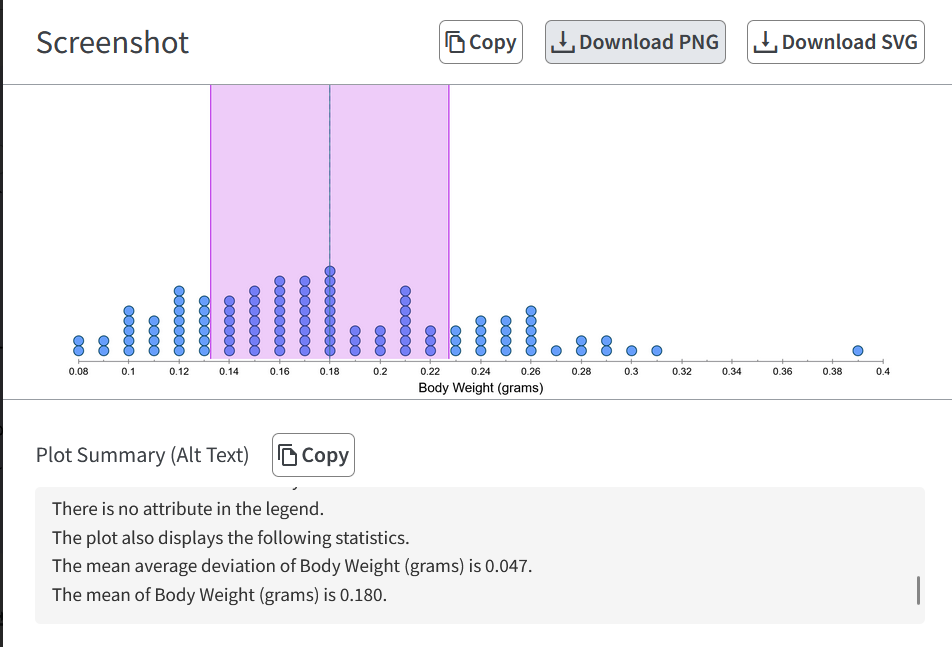
Plot Summary Now Includes Summary Statistics:
The Plot Summary — the text description of the plot available to screen reader users
and in screenshots — previously described only the plot structure (axes, ranges,
attributes, and case counts), leaving out the statistics displayed in the Summary View.
It now reads out summary statistics as natural-language sentences appended to the summary,
for example: “The mean of Age (Years) is 15.33” or “LSL-1 has the equation
y = (3.3167)x + 10.7 with r = 0.171 and r² = 0.029.” The statistics covered
include mean, median, mode, mean average deviation, IQR, standard deviation, variance,
standard error, least squares regression lines, and movable lines, across all graph types,
including in random sampling mode.
-
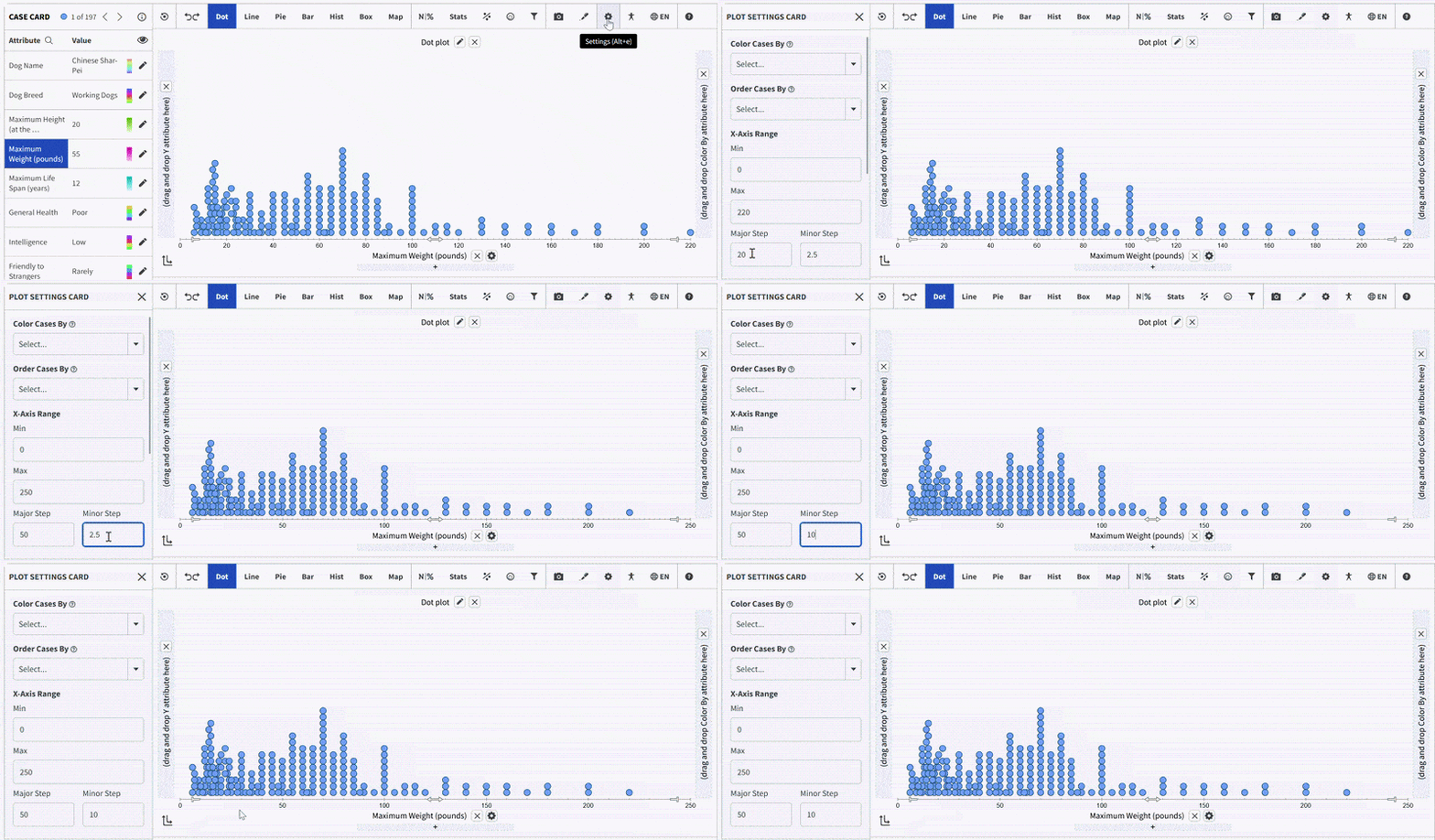
Axis Tick Mark Controls — Major and Minor Steps:
As part of the broader effort to expand authoring controls, the Plot Settings card now
includes Major Step and Minor Step fields for numeric X and Y axes. The Major Step controls
the spacing between major tick marks, while the Minor Step controls the spacing between minor
gridlines (setting it to 0 removes them). The fields accept whole numbers, decimals, and
fractions, supporting classroom needs like skip-counting by 2s, 5s, or 10s in early grades,
fraction number lines (steps of 1/2, 1/4, or 1/8), and decimal number lines in tenths or
hundredths.
-
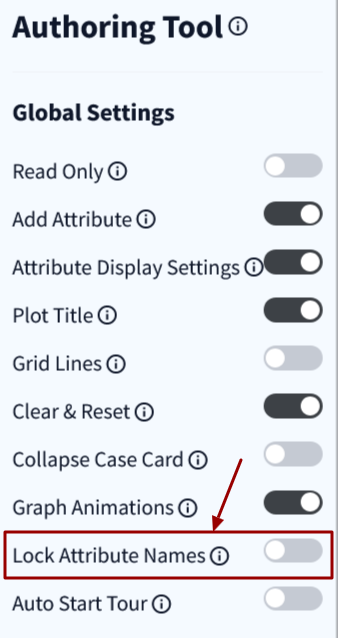
Lock Attribute Names in Insert Data Mode:
Users working in Insert Data mode could accidentally edit column headers, and because
formulas reference attributes by name, renaming an attribute broke any equations that
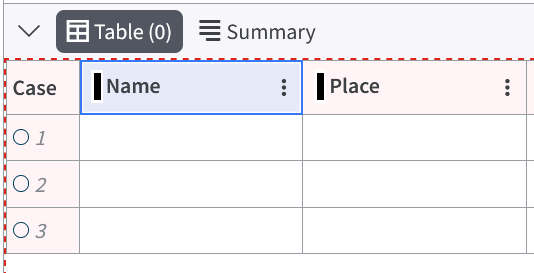
depended on it. Authors now have a Lock Attribute Names toggle in the authoring tool. When
enabled, attribute names are locked in both the table header and the Attribute Settings
Card, and a lock icon appears in the header to indicate why the name can't be edited.
(#3070)
-
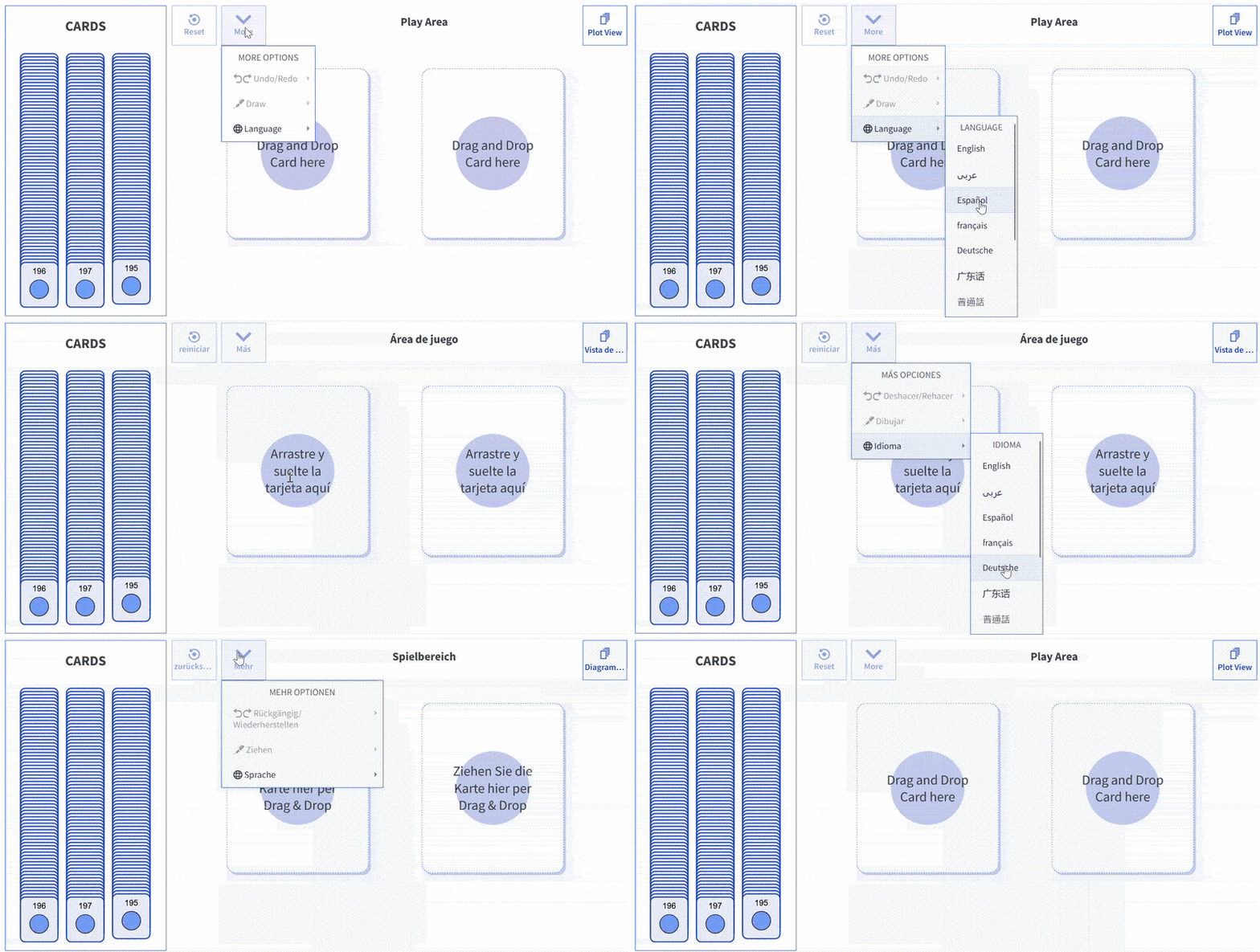
Language Switcher Added to Tuva Jr. Play View:
We have added support for changing the display language directly within the Play View;
previously, there was no way to switch languages without leaving the view. When a new
language is selected, the Play View interface and content text update accordingly. Button
labels that run long in some languages (such as German) are gracefully truncated with
ellipses to keep the layout intact.
- Simulation Components in the Authoring Tool: The Authoring Tool can now accept any simulation component as a child element and render it alongside the Tuva data tools. A common DataProvider API was built to handle communication between the Authoring Tool, the data tools, and the embedded simulation, so data generated by a simulation can flow directly into the data exploration environment. This lays the groundwork for partners building simulation-based learning experiences on top of Tuva.
Accessibility
- Easier Navigation Through Nested Dropdown Menus: Students navigating nested submenus (for example, Stats → Averages → Mode) would often lose the submenu if their mouse strayed slightly off the direct path — the menu would close before they reached their destination. The submenu hover timing has been reworked so menus stay open as users move through them, making nested menus far more forgiving, particularly for younger students using Tuva Jr.
- Toolbar Menu Keyboard Focus Fixes: Keyboard focus in the toolbar menus behaved incorrectly in Firefox, and menu items could not be reliably activated with the Enter key. Both issues have been fixed — keyboard users can now navigate and activate toolbar menu items consistently across browsers.
- Play View Keyboard and Reverse Contrast Support: The Tuva Jr. Play View now supports keyboard navigation with shortcuts, and Reverse Contrast mode has been extended to cover the Play View — so students with visual sensitivities or low-vision needs can use it with their preferred display settings. Further refinement of the keyboard navigation pathways is planned for an upcoming release.
Bug Fixes
- Attribute Color Changes Not Reflected in Table View Header: When a user changed an attribute's color in the Case Card, the color bar in the corresponding table view column header did not update. Colors for both categorical and quantitative attributes now stay in sync between the Case Card and the table view.
- Draw Mode Screenshots Missing Images: When a student added an image to the drawing area in Draw Mode and then used the picture button to capture their work, the image did not appear in the exported screenshot; only the annotations were captured. Screenshots now capture all elements, including images. Additionally, the plot summary and plot title, which aren't relevant in Draw Mode, are now hidden from the screenshot popup to avoid clutter.
- Tuva Jr. Plot State Restore Font Bug: In Tuva Jr., saving a plot state while the Add Attribute card and an individual case card were visible, then restoring it, caused fonts to render much larger than intended. The plot state now restores with the correct layout and font sizes.
- Orphaned Tooltips: Tooltips, context menus, and color pickers were refactored to use a single shared instance behind the scenes. This prevents “orphaned” tooltips — tooltips that remained stuck on screen after the element that triggered them was gone — and ensures smooth, correctly positioned transitions as users move between elements.